
No matter what reason, you should always format and reset the device. It’s very important to let you know that Android formatting means just deleting the user data i.e images, videos, songs, contact numbers, etc. Which you have saved in the phone memory. It will not touch the operating system. Formatting a Android brings the total loss of user information, not the system itself. Equivalent to formatting a PC, the system would remain intact, but completely clean customizations.
As I said before, a factory reset will erase all of your phone’s data and restore it to the original settings, all of your data will gone forever and can’t be recovered. So, don’t forget to make a backup of your important data. This guide will walk you through formatting your device.
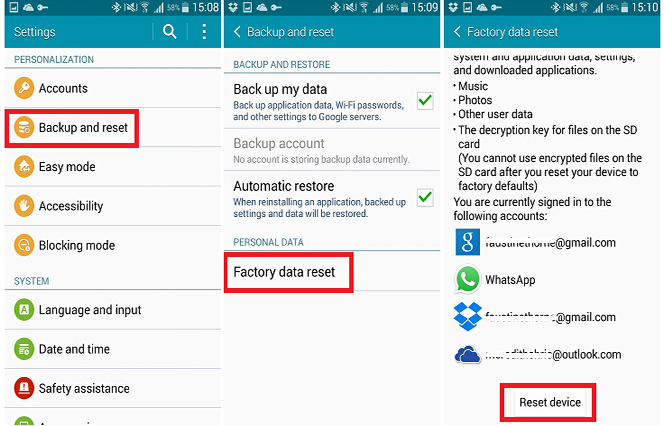
Open the menu and select Settings, then in the section, choose Personal Backup and restore. Once inside we choose Factory data reset. Tap “Reset device” to delete all data on your phone and restore original factory settings. By default, all your phone’s internal storage will be erased. After a few minutes you will have a whole new phone!

 RenewAndroid: Expert at Data Recovery, Phone Transfer and More